Saturday, October 28, 2017

Acer Iconia A1-830 7.9" Inch Tablet Case Smart Cover Stand for Acer Iconia Tab

This case is designed for Acer Iconia A1-830 7.9" Inch only. It will not fit the Acer Iconia A1-810 7.9" Inch or any other Acer Tablet.

Description:

The Slim Fit Folio Leather Case offers secure protection for your tablet while adding a range of versatile options.

A smart holder is designed to hold your stylus pen, while a soft inner liner and protective corners help safeguard the tablet against scratches and damage.

The Slim Fit Folio Leather Case offers an ideal way to protect your tablet wherever you go.

Features:

Specially design for Acer Iconia A1-830. Made from durable synthetic leather with soft interior for protection.Cover has flip capability to transform the case into a horizontal viewing stand.Open interior pocket for easy insertion of your device and Velcro flap to secure it in place.Designed with a smart holder for stylus / pen.Color: Black.

Package Included:

1 x Acer Iconia A1-830 7.9" Tablet Case Cover Stand

1> We ar e NZ registered company and GST invoice can be supplied.2> We promise refund or replacement within the first 30 days. More details please refer to the Trade Me "Profile".3> We do the same day dispatch for order with payment received before 2:00PM on week day by CourierPost overnight & signature service.4> We are trying to do the best customer service. Please contact us via mail or phone for any problem freely. Your support is much appreciated! Please click here to ask a question

You must have Javascript enabled to ask and answer questions

Your question and answer privileges have been disabled.

You must log in to view questions and answers on this listing. We recommend reading questions before you make any purchases. You must log in to ask or answer questions posted. We recommend reading questions before you make any purchases. Available only to approved bidders. You must be an authenticated member to ask questions Find out more about becoming authenticated. Your account is in debt Your current account balance is You must credit your account to use this feature.
Source: Acer Iconia A1-830 7.9" Inch Tablet Case Smart Cover Stand for Acer Iconia Tab

Friday, October 27, 2017

Apple iPhone X delivery times stretch out for weeks after pre-order blitz

Go get in line now

If you wanted the new Apple iPhone X and weren't poised over your mouse and keyboard at 12:01 a.m. PDT this morning, well, it's now going to be a while – maybe a very long while – until you can get one. According to CNET and numerous other outlets where technophiles were hoping to scoop up the new phone, they were pretty much gone in ten minutes.

That's when the shipping delays began to pop up, and most cell phone carriers, along with Apple, are now showing a five to six week delay in shipping times. That means if you slept through the pre-order window, your only recourse now to get one in the short term is to get in line at an Apple Store or shell out big time for one elsewhere. The new iPhone Ten is $999 for the base 64gb model, and the 256gb model is $1149. Or, slightly more on eBay. Good luck.

Everything is fine, mostly

Speaking of expensive smartphones, Google is currently involved in a bit of… confusing messaging about the display problems with the new Pixel 2 XL handset, which has seen recent complaints of ghosting or burn-in, and now, an odd blue tint at times. According to BGR, Google is saying the displays are working just fine, but they know about the issue and just to be safe, they are extending the warranty to two years in case something… were to go wrong with them.

In a post, a Google VP says the company is aware of the complaints, and in a much more technical deep dive post about the display tech, another Googler says the displays are "as great as we hoped they would be," but just in case, software updates will be issued that fade out the lower on-screen buttons after a few seconds to avoid any issues anyone might be experiencing. The display will also be dimmed ever so slightly; they say you won't notice.

Interestingly, it seems the display problems are essentially affecting just the XL model, the regular Pixel 2 seems to be fine, just fine. Google also claims the problems the XL screens are having are "in line with that of other premium smartphones." Once the OLED iPhone X finally arrives next week, we'll just have to see about that.

Best diary ever

Given the popularity of Apple's iPads, Pencil stylus, Microsoft's Surface tablets and their Surface Pen and so on, you'd think trying to force another pen-and-slate product into the marketplace would be a bad idea. But Windows Central is claiming Redmond is indeed pushing ahead with just such a device, but it has a key difference: the device will be foldable, like a book, and it'll also have phone capabilities and will focus on a more pen-and-digital ink experience.

It even has a cool name: Andromeda. Windows Central says the device may be similar to a past effort at a similar device that didn't make it to market: Microsoft Courier. The Andromeda device or devices will reportedly run Windows 10 (everything likely will, eventually), and with a focus on a more traditional input style – actual writing – could appeal to technophobes who have kept current tablet and laptop tech at arms length.

We've seen highly flexible OLED displays and other flex-display tech, but will the bendy screens stand up to thousands of cycles of opening and closing? Hard to tell, but, we're intrigued. There's no shortage of people who love to write and draw in journals and so forth, and if they could have that experience along with the perks of modern computing, it could be a whole new product category.

We've got more news on our Facebook page and YouTube channel, and be sure to tune in to this week's DT podcasts: Trends with Benefits (general tech shenanigans)  on Thursdays, and Between the Streams (movie and TV topics) every Friday.

Don't Miss

DT Daily: Jony Ive ushers in 'adaptergate' with the new MacBook

Up Next

These are the best processors for building a PC on any budget


Source: Apple iPhone X delivery times stretch out for weeks after pre-order blitz

Thursday, October 26, 2017

Women in Scotland allowed abortion pill at home

Women in Scotland allowed abortion pill at home By Lucy Adams BBC Scotland correspondent
  • 26 October 2017
  • From the section Scotland
  • Share These are external links and will open in a new window
  • Share this with Messenger
  • Share this with Messenger
  • Share this with Pinterest
  • Share this with WhatsApp
  • Share this with LinkedIn
  • Copy this link

    http://www.bbc.co.uk/news/uk-scotland-41760959 Read more about sharing. Close share panel Abortion pills Image caption Misoprostol is sold under the brand name Cytotec among others

    Women in Scotland are the first in the UK to be allowed to take the abortion pill at home.

    Scotland's Chief Medical Officer has written to all health boards to say the drug misoprostol can be taken by women outside of a clinical setting.

    The change brings Scotland in line with other countries such as Sweden and France.

    The British Pregnancy Advisory Service (BPAS) has been lobbying to change the law in the UK for years.

    Two tablets

    There were 12,063 terminations of pregnancy in Scotland in 2016 and almost three-quarters (73.5%) were carried out at less than nine weeks gestation.

    The vast majority of these early terminations (89.4%) were medical rather than surgical procedures.

    The medical treatment involves taking two different medicines.

    The first tablet, called Mifepristone, blocks the action of the hormone progesterone, which is needed to maintain the pregnancy.

    The second tablet, called Misoprostol, can be given on the same day, or 24, 48 or 72 hours apart.

    Image copyright Getty Images Image caption The tablet will be given out at a clinic but can be taken at home

    Not all women are suitable for a medical abortion, although they may still be suitable for a surgical abortion.

    The change in Scotland would mean the second tablet Misoprostol - would be administered in a clinical setting but could be taken by women at home.

    Within an hour of taking misoprostol women often experience heavy bleeding - usually on the way home from the clinic.

    This is a particular concern for women in Scotland who often have to travel long distances to access abortion and maternity services.

    The Scottish government said it was making the changes under existing abortion powers.

    Public Health Minister Aileen Campbell said: "Abortion can be an emotive subject - however I am proud this government is working hard to ensure women are always able to access clinically safe services.

    "Scotland is now the only part of the UK to offer women the opportunity to take misoprostol at home when this is clinically appropriate, a decisi on that allows women to be in control of their treatment and as comfortable as possible during this procedure."

    Privacy of home

    Ann Furedi, chief executive of the BPAS, welcomed the decision.

    She said: "This will spare women not only the difficulties associated with having to make more than one clinic visit - childcare, transport, time off work - but it will also spare women from the risk of symptoms on their way home, having taken the medication in a clinic."

    "It is simply perverse that a woman arriving at a BPAS clinic in England and Wales with an incomplete miscarriage can be given the medication to take in the comfort and privacy of her own home, while a woman seeking an abortion must take that same medication on site.

    "We hope that the government will follow Scotland's lead and roll out this important policy change across the rest of Great Britain."

    However, John Deighan, chief executive of the Society for the protection of Unborn Children (SPUC) Scotland, said the change would mark "a return to the days of back street abortions with no medical oversight".

    He added: "The reality is that this will have many vulnerable women who may be desperate about the situation they are in, pushed towards what is seen as the easy option of being handed some drugs and sent home to stop being a problem for society."


    Source: Women in Scotland allowed abortion pill at home

    Wednesday, October 25, 2017

    Why We Must Fight for the Right to Repair Our Electronics

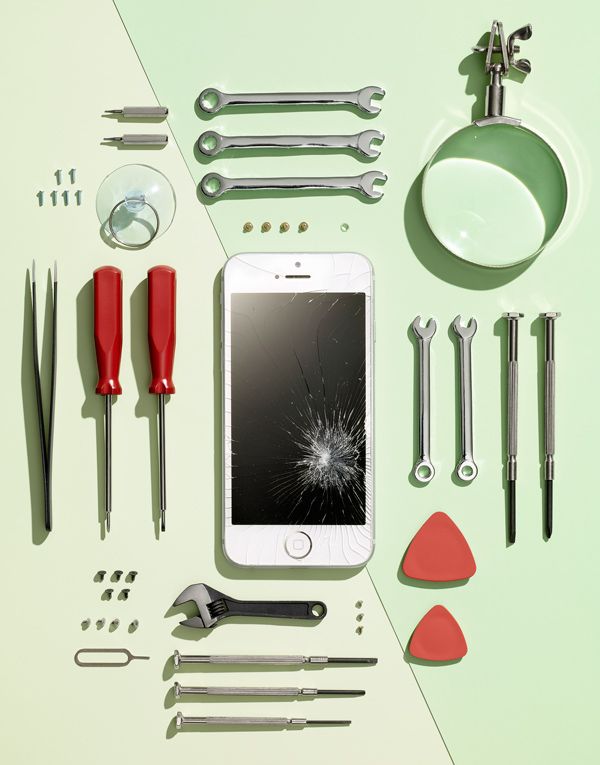
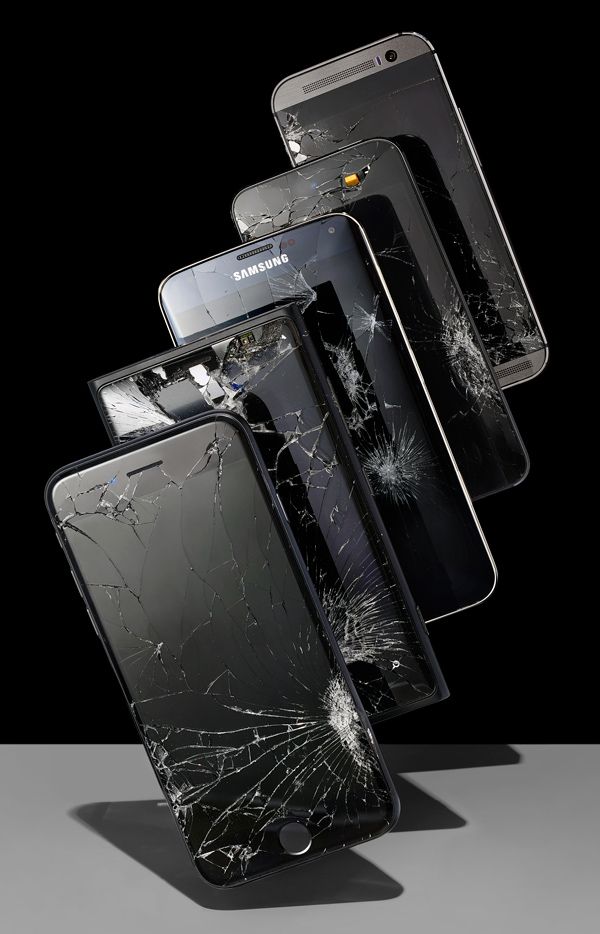
    illustration Photo: The Voorhes

    The Consumer Technology Association estimated that residents of the United States bought 183 million smartphones in 2016. There are already as many TVs in this country as there are people. That's a lot of electronics, and these numbers are just going up.

    On balance, all this technology is probably making our lives better. But there's a downside, too: The stuff often malfunctions. Unlike the 30-year-old mixer on your kitchen counter that refuses to die, new technology—especially the smart devices with fancy, embedded electronics—breaks more quickly. That trend, confirmed by a recent study by the German government, applies not just to delicate products like smartphones and tablets but also to equipment we would expect to last for a long time—like televisions, washing machines, and even tractors.

    Manufacturers would prefer to sell you their latest models rather than repair your old electronics, so they work to make fixing their products too expensive or too impractical. It's a global problem because the marketplace for technology is global, and people everywhere are affected. With so many people throwing out so much broken stuff, it should come as no surprise that e-waste is the fastest-growing waste stream, with tens of millions of tons discarded annually around the world.

    Tossing things out instead of fixing them has far-reaching consequences—for consumers, for the economy, and for the environment. Indeed, a future in which nothing ever gets repaired isn't bright for anyone except the people trying to sell you new products. And many of us are not prepared to accept that future without a fight.

    In 2013, a group of concerned consumers, recyclers, refurbishers, environmentalists, digital-rights advocates, and repair specialists in the United States teamed up to found Repair.org, of which one of us (Gordon-Byrne) is executive director and the other (Wiens) is chairman of the board. We're working to make sure that when something breaks, U.S. consumers can easily find the information and parts they need to repair it, or else have it repaired by whomever they choose.

    Over the past few years, this battle has been heating up. In 2017, twelve states introduced "right to repair" legislation that would make it easier for consumers to fix broken digital equipment. With grassroots support, Repair.org is leading the charge to turn these bills into laws. Not surprisingly, we've encountered significant resistance, not from lawmakers but from lobbyists hired by large tech companies to kill right-to-repair bills behind closed doors.

    You might think that these legislative battles are inconsequential or don't have too much to do with you personally. But if you believe that when you buy something you actually own it, you should pay attention as we explain why that may not be the case and give the history of how we got to today's very odd situation.

    img Photo: The Voorhes

    People have been fixing electronic devices for as long as they have existed. You know the drill: When something breaks, you troubleshoot the problem, take the thing apart, fix or replace the failed component or subassembly, and turn the machine back on. If it works, great. If not, try again. It's as simple as that.

    The trouble with repairing computerized products—a category that just keeps growing and includes pretty much anything you plug into the wall or run off a battery these days—is that the path to repair isn't always so straightforward. Sometimes it's easy to see that a connection has come loose or that a capacitor has gone bad, but for the most part identifying and correcting the underlying problem requires sophisticated diagnostic tools and detailed service documentation. If the manufacturer refuses to provide those things, repair is still possible, but it's a lot more difficult. Every repair becomes an R&D project.

    In past decades, companies that made electronic equipment typically provided the information needed for repair—and usually free of charge. Computers came with schematic diagrams showing how the various components on the circuit boards were connected. Even Apple, now one of the most repair-unfriendly gadget makers in the business, sent a free, exhaustive manual—complete with schematics—to owners of the Apple II. It was expected that many owners would repair and maybe even tinker with their equipment.

    But as the years went on, this kind of information became scarcer. It's ironic. We live in the age of information. And yet, at the very moment when information about how to repair electronics should be easiest for owners to get their hands on, it has dried up.

    That scarcity is by design. Manufacturers don't want you to fix that broken microwave or air conditioner; they want you to buy a new one. Some even send cease-and-desist letters to people who post repair information online. Back in 2012, Toshiba told laptop repair tech Tim Hicks that he needed to remove 300 PDFs of Toshiba's official repair manuals from his website, where he was offering the information for free. To avoid being sued, Hicks complied, and now fewer people have the guidance they need to repair Toshiba laptops.

    Toshiba isn't the only guilty party. Go to Apple's website and try to find a repair manual for a MacBook Pro. It's not there. Go to Samsung's website and look for ways to fix your flat-screen TV. You'll come away empty-handed. Same for your Keurig. Or your Kindle. Or your GoPro. Or your Lexmark printer that's always broken. You'll probably find user manuals and perhaps a few other online resources created by people who figured out how to fix the broken product on their own. But manufacturers by and large remain silent on the topic of repair.

    Instead, they put official service information and diagnostic tools behind passwords and paywalls, limiting the distribution of repair information to a select few "authorized" providers. Without access to repair instructions, customers are forced to use these authorized service centers, which can charge high prices because there are no alternatives—except perhaps buying a  new device.

    That's why one of us (Wiens) created iFixit, a company that takes apart popular models of consumer electronics to reverse-engineer repair instructions and then posts the information for free online. The instructions come from iFixit, not the manufacturer, so iFixit can't be sued for disseminating proprietary repair information.

    E-Waste Outstrips Population chart Source: The Global E-Waste Monitor 2014, Institute for the Advanced Study of Sustainability/United Nations University

    Even if you happen to find repair instructions on iFixit's website or elsewhere, you still have to locate replacement parts. In some cases, parts are so difficult to get from the manufacturer that people instead extract them from junked equipment, as if they were harvesting organs from the recently deceased. Things are even harder for small repair shops, which struggle to find reliable sources of high-quality replacement parts.

    The lack of service parts is an especially big impediment when it comes to repairing smartphones, tablets, and gaming devices. Together, those products number in the billions, and yet many models have no independent sources for fragile items like glass. That's crazy because glass, of course, breaks frequently. Fixing it is a big business for phone manufacturers like Apple and Samsung, which are fighting vigorously to protect their monopolies on repair. As of September 2014, gadget insurance company SquareTrade estimated that Americans had spent US $10.7 billion on iPhone repairs since the phone's 2007 introduction.

    Apple may be the worst offender when it comes to refusing to sell service parts or provide repair information to anyone but its authorized service providers. The company doesn't even provide such information for equipment that Apple won't repair anymore (Apple has a long list of "vintage and obsolete" devices it no longer supports) or for repairs that its "Geniuses" aren't skilled enough to do, like fixing a computer's motherboard.

    In 2015, the company went even further—remotely disabling iPhones whose screens had been repaired outside of Apple's authorized network. One of those dead devices belonged to Antonio Olmos, a photographer for The Guardian. He broke his screen while covering the refugee crisis in the Balkans. There's no Apple store in Macedonia, so Olmos had a local repair shop replace the broken screen with an aftermarket part. It worked great. Months later, though, after a routine software update, Olmos's phone stopped working simply because of that screen.

    At first, Apple defended "error 53" (as the problem was identified) as a security measure. The company blamed unauthorized repair shops: "When an iPhone is serviced by an unauthorised repair provider, faulty screens or other invalid components that affect the touch ID sensor could cause the check to fail if the pairing cannot be validated. With a subsequent update or restore, additional security checks result in an 'error 53' being displayed," an Apple spokesperson told The Guardian.

    But that explanation didn't fly with owners. Independent repair shops didn't break these phones; Apple did. And the aftermarket screens hadn't been faulty; they just hadn't been made by the original equipment manufacturer—because Apple refuses to sell OEM screens to independent repair shops.

    Bowing to public pressure, Apple apologized and fixed the broken phones with a new update. But a precedent had been set. Previously, Apple had made it difficult for people to fix its products by restricting access to parts and service information. Now, to those owners who dared to repair their equipment without the company's blessing, Apple could dole out punishment—with software.

    imgimg

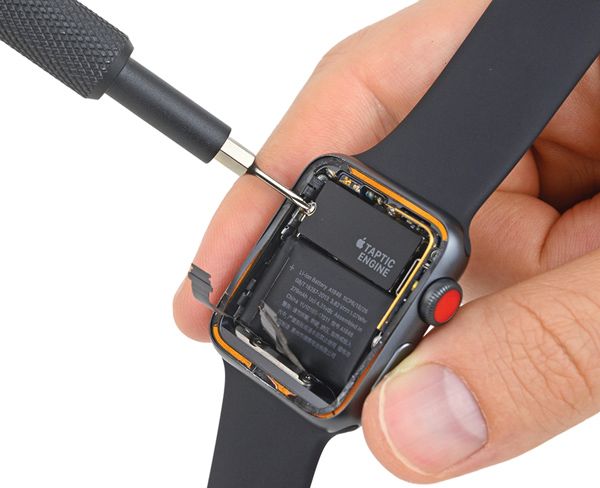
    Photos: iFixit No Serviceable Parts: Or so manufacturers would have people believe when it comes to electronic devices such as smart watches and mobile phones. But repair is often possible, using replacement parts and instructions from other sources.

    In 2011, the entrepreneur and venture capitalist Marc Andreessen quipped in an op-ed for The Wall Street Journal that "software is eating the world"—meaning that it's now in pretty much everything: phones, microwave ovens, coffeemakers, sewing machines, even Barbies. And it's threatening to gobble up repair with it.

    All computerized equipment comes with embedded software—code that tells the machine what to do and how its components should function together. Without that code, our coffee doesn't brew, our cars don't shift gears, and our sewing machines can't stitch.

    When you buy such a machine, the hardware becomes yours. But if you ask manufacturers, they'll say that the software inside still belongs to them. It's copyrighted, and most manufacturers don't want you to touch it, even if the thing is broken. And thanks to a controversial U.S. law called the Digital Millennium Copyright Act (DMCA) [PDF], manufacturers are allowed to put digital locks on the code to stop people from meddling with (or even looking at) it. The European Union's Copyright Directive has similar provisions. Originally, these sorts of laws were designed to prevent pirates from copying movies and music. But, increasingly, manufacturers use them to maintain control of the products they sell to you.

    Lexmark famously used the DMCA to sue Static Control Components, which was making chips that allowed other companies to refill Lexmark toner cartridges and sell them again. Recently, HP went so far as remotely disabling unlicensed cartridges installed in its printers. Even John Deere deploys digital locks to make sure that only its own technicians can fix anything software-related on its agricultural machines.

    When asked why it was standing in the way of farmers who want to fix their own tractors, the company replied that farmers didn't really own their tractors. According to John Deere [PDF], farmers have only "an implied license for the life of the vehicle to operate the vehicle," and farmers (or their mechanics) aren't allowed to fiddle with the software to effect a repair.

    Naturally, that position upset a lot of farmers, who assumed that when they plopped down $75,000 or more for a new tractor, they were buying the whole thing. They felt they should be able to fix their tractors on their own terms. And it turns out that the farmers were right.

    Authorities in the U.S. Copyright Office—who presumably have a deeper knowledge of U.S. copyright law than John Deere does—have generally sided with consumers when it comes to repair. In 2015, copyright officials told John Deere that owners do have the right to repair their own tractors and other equipment. And, in December 2016, the copyright office concluded a yearlong study [PDF] on copyright law, repair, and embedded software that solidly confirms that repair is legal under copyright law. The same study argues that federal copyright law can't be used as an excuse to prevent repair.

    But that hasn't stopped some manufacturers from continuing to try. For example, as part of John Deere's 2016 End User Licensing Agreement, the buyer agrees to give up all control over the electronics within the machine—including sensors, actuators, and computing units, as well as data, documentation, and diagnostics. What's more, the buyer is assumed to have agreed to the contract simply by switching on the machine [PDF]. There is no discussion. No negotiation. No signature requirement. Just turn the key and you waive your right to own critical parts of the machine you just bought.

    So how can people in the United States preserve their right to repair electronics? The answer is now apparent: through right-to-repair legislation enacted at the state level.

    Popular support on this issue has been clear since 2012, when 86 percent of the voters in Massachusetts endorsed a ballot initiative that would "[require] motor vehicle manufacturers to allow vehicle owners and independent repair facilities in Massachusetts to have access to the same vehicle diagnostic and repair information made available to the manufacturers' Massachusetts dealers and authorized repair facilities."

    Carmakers howled in protest, but after the law passed, they decided not to fight independent repair. Indeed, in January 2014 they entered into a national memorandum of understanding [PDF], voluntarily extending the terms of the Massachusetts law to the entire country. The commercial vehicle industry followed suit in October 2015.

    Now we need right-to-repair legislation for other kinds of equipment, too, particularly electronic equipment, which is the focus of "digital right to repair" initiatives in many states.

    Similar to the Massachusetts legislation for automobiles, these digital-right-to-repair proposals would require manufacturers to provide access to service documentation, tools, firmware, and diagnostic programs. They also would require manufacturers to sell replacement parts to consumers and independent repair facilities at reasonable prices.

    The bills introduced this year in a dozen states have some variations. The ones in Kansas and Wyoming, for example, are limited to farm equipment. The one most likely to be adopted soon is in Massachusetts, which seeks to outlaw the monopoly on repair parts and information within the state. If it passes, electronics manufacturers will probably change their practices nationwide.

    Consumers would then have more choices when something breaks. The next time your smartphone screen cracks, your microwave oven gets busted, or your TV dies, you may be able to get it fixed quickly, affordably, and fairly. And you, not the manufacturer, would decide where your equipment is repaired: at home, with the manufacturer, or at a local repair shop that you trust.

    The right to repair electronics isn't just about repair or even about technology⁠—it's about ownership. You bought the thing, and therefore you own it—and not just part of it but all of it. And that means you should be able to fix it or get it fixed by whomever you choose. The terms of ownership shouldn't change just because the product has a chip in it.

    This article appears in the November 2017 print issue as "The Fight to Fix It."

    Kyle Wiens is cofounder and CEO of iFixit. Gay Gordon-Byrne is executive director of Repair.org. 


    Source: Why We Must Fight for the Right to Repair Our Electronics

    Saturday, October 21, 2017

    Smartphones, Tablets Sabotaging Teens' Sleep

    FRIDAY, Oct. 20, 2017 (HealthDay News) -- Teens sleep less than they used to, sacrificing shuteye to spend more time on their phones and tablets.

    Experts say teens need at least nine hours of sleep a night to be engaged and productive during the day. Anything less can cause daytime sleepiness and interfere with school or daily activities.

    Faced with an array of tempting distractions, how much sleep are today's teens actually getting? To find out, researchers analyzed a pair of long-term, national surveys of more than 360,000 eighth- through 12th-graders.

    One survey asked eighth-, 10th- and 12th-graders how often they got at least seven hours of shuteye. The other asked high school students how long they slept on a typical school night.

    In 2015, 4 out of 10 teens slept less than seven hours a night. That's up 58 percent since 1991 and 17 percent more than in 2009 when smartphone use became more mainstream, the researchers said.

    "Teens' sleep began to shorten just as the majority started using smartphones. It's a very suspicious pattern," said study leader Jean Twenge, a psychology professor at San Diego State University.

    The more time students reported spending online, the less sleep they got, according to the study published Oct. 19 in the journal Sleep Medicine.

    Those who were online five hours a day were 50 percent more likely to be sleep-deprived than classmates who limited their daily time online to an hour.

    Studies have shown that light from smartphones and tablets can disrupt the body's natural sleep-wake cycle.

    "Our body is going to try to meet its sleep needs, which means sleep is going to interfere or shove its nose in other spheres of our lives," said study co-author Zlatan Krizan, an associate professor of psychology at Iowa State University. "Teens may catch up with naps on the weekend or they may start falling asleep at school."

    Though smartphones, tablets and other electronic devices are often an essential part of life, the researchers said moderation is key. Everyone -- young and old alike -- should limit use to two hours each day, they advised in a San Diego State University news release.

    "Given the importance of sleep for both physical and mental health, both teens and adults should consider whether their smartphone use is interfering with their sleep," Twenge said. "It's particularly important not to use screen devices right before bed, as they might interfere with falling asleep."

    More information

    The National Sleep Foundation provides more information on teens and sleep.

    SOURCE: San Diego State University, news release, Oct. 19, 2017

    -- Mary Elizabeth Dallas

    Last Updated: Oct 20, 2017


    Source: Smartphones, Tablets Sabotaging Teens' Sleep

    Friday, October 20, 2017

    Dr. Reddy's, fighting to recover from FDA warning letter, recalls 500K heartburn tablets

    Still struggling to turn its manufacturing around, Dr. Reddy's is recalling 569,000 store-brand famotidine tablets in the U.S., thanks to failed tests for impurities and degradation. It's the India-based company's second recall of the same medication since last July.

    The meds were sold at CVS pharmacies as CVS Pharmacy Acid Controller and at Walmart under the Equate label, according to the FDA's latest Enforcement Report. It's a Class III recall, meaning the suspect drugs aren't likely to cause injury to humans.

    Dr. Reddys pulled more than 84,000 famotidine tablets, also produced for CVS, last July. In both cases, the company found an out-of-specification result during routine stability testing. The new recall is nationwide.

    RELATED: The top 15 generics makers by 2016 revenue - Dr. Reddy's

    The latest recall comes as the generics maker continues to suffer FDA citations at multiple manufacturing plants, including some included in a 2015 warning letter. Its ongoing manufacturing problems triggered a decline in U.S. sales, making a dent in its fiscal 2017 results announced in May.

    That same month, Dr. Reddy's reported that an inspection of its Bachupally formulation plant in Hyderabad resulted in an FDA Form 483 with 11 observations.

    That notice came as Harvard Drug Group recalled about 9,200 cartons of the antifungal drug fluconazole manufactured at the Bachupally plant. And it followed two other Form 483s, one in April and another in February, citing problems at active pharmaceutical ingredient (API) plants in Srikakulam and Miryalaguda that had featured in that 2015 warning letter.

    RELATED: Dr. Reddy's blasted in warning letter for hiding existence of testing lab from FDA

    The company's manufacturing issues also prompted a fraud lawsuit from South Korea's Mezzion. The FDA had rejected Mezzion's drug candidate udenafil because of manufacturing problems. Mezzion alleged that Dr. Reddy's repeatedly said it was compliant with FDA regulations when it was not and that Dr. Reddy's "was the sole reason given by the FDA" for denying udenafil's approval.


    Source: Dr. Reddy's, fighting to recover from FDA warning letter, recalls 500K heartburn tablets

    Thursday, October 19, 2017

    iOS 11 latest version, problems, fixes, features, compatibility

    Everything you need to know about the new iOS 11, including the latest version, problems (and fixes), new features and compatible devices

    iOS 11 offers big improvements over its predecessor, iOS 10 and is now available to download for your iPhone or iPad. Here, we bring you everything you need to know about iOS 11 including the latest version, details of any problems people are encountering, and the recommended fixes.

    In our latest update to this article, Apple explains why WiFi and Bluetooth won't turn off, read more here.

    What is the latest version of iOS?

    iOS 11 becamse available to download on 19 September 2017. If you are wondering whether you should install iOS 11, read this. Plus, here's how to install iOS 11, and how to downgrade to iOS 10 if you change your mind.

    We will list the updates to iOS 11 that have rolled out since the main launch, along with any changes they bring. At some point, an update will add Peer-to-Peer payments so that you can pay your friends directly via your iPhone.

    iOS 11.0.1

    iOS 11.0.1 was the first update to iOS 11. It was issued on 26 September and fixes a few known problems with iOS 11 including the following:

  • Fixes the Microsoft Outlook/Exchange Server issues that were stopping emails from sending.
  • Changes to Wi-Fi and Bluetooth settings help alleviate battery problems.
  • iOS 11.0.2

    Apple released iOS 11.0.2 on 3 October 2017. The update addresses the following:

  • An issue with crackling sounds that could occur during calls
  • An issue that caused some photos to become hidden
  • An issue where attachments in S/MIME-encrypted emails wouldn't open
  • The build number is 15A421.

    iOS 11.0.3

    iOS 11.0.3 was released on 11 October 2017. It fixes:

  • An issue where audio and haptic feedback would not work on some iPhone 7 and 7 Plus devices
  • An issue where touch input was unresponsive on some iPhone 6s displays because they were not serviced with genuine Apple parts 
  • However, those who have already installed the update are reporting poor performance and degraded battery life, as well as problems with stability, Bluetooth and TouchID.

    Current Beta versions of iOS 11

    Apple has seeded iOS 11.1 to developers.

  • It includes some interface changes.
  • iOS 11 release date

    iOS 11 release date

    Which iPhones & iPads can get iOS 11?

    The devices that'll be able to update to iOS 11 are:

    iPhone 8 Plus iPad Pro 12.9-inch (2017) iPhone 8 iPad Pro 12.9-inch (2015) iPhone 7 Plus iPad Pro 10.5-inch iPhone 7 iPad Pro 9.7-inch iPhone 6s Plus iPad Air 2 iPhone 6s iPad Air iPhone 6 Plus iPad 5th generation iPhone 6 iPad 4th generation iPhone SE iPad mini 4 iPhone 5S iPad mini 3 iPod Touch 6th gen iPad mini 2

    The iPhone X will also run iOS 11 - it will ship with iOS 11 already installed.

    We look in more detail at iOS 11 compatibility in more depth in a separate article: Can my iPhone and iPad run the new version of iOS?

    iOS 11 problems and fixes

    Despite Apple's extensive testing and the public and developer beta programs, there are still inevitably problems with the new version of the iPhone and iPad software. As we hear of them we will outline them here, along with any fixes that have been suggested.

    If you are having any issues with your iPhone or iPad let us know. There have been reports of not being able to connect to the WiFi network, the device filling up its storage too quickly, the screen freezing or buttons becoming unresponsive, and Message syncing issues with iCloud.

    Below we will look at some of the key issues and the suggested fixes for them.

    Battery issues

    There are concerns about the battery inside the iPhone 8, with reports of two iPhones breaking after the battery burst the case open. Apple is said to be investigating the claims, which were made about iPhones bought in Taiwan and Japan. We have more information in this article: iPhone 8 battery problems: Latest news & what to do.

    In addition to this, mobile security firm Wandera, has identified some battery life concerns following the update to iOS 11.

    The company monitored 50,000 iPad and iPhone users on its networks and found that those using iOS 11 were finding that their battery was draining 'twice as fast' as those on iOS 10.

    This battery life issue could be related to the way Spotlight reindexed iOS 11 once installed, and also it could be due to users trying out new features and thereby using their device in an unusual way.

    If you are experiencing a problem with battery life then the suggestion was that factory resetting your iPhone or iPad could fix it, but this would mean wiping your device. Here's how to factory reset your iPhone or iPad.

    Apple's iOS 11.0.1 update was thought to go some way to correcting the battery life issues, by addressing WiFi and Bluetooth settings. However, battery life appears to be the top complaint from those who have installed iOS 11.0.3.

    You can also save battery life by following our tips here: How to save battery life on iPhone.

    Crackling (or 'static') noise

    Some users reported hearing an annoying crackling noise from their iPhone's earpiece during phone or FaceTime calls since updating to iOS 11 - but it only seems to affect the new iPhone 8 and 8 Plus handsets. Apple has addressed this with a patch in iOS 11.0.2 (discussed above).

    WiFi & Bluetooth issues with iOS 11

    Users have been confused to find that when they toggle Bluetooth and Wi-Fi off in iOS 11 Control Centre on their iPhone it doesn't actually turn off the functions.

    Apple explains that this is so that the following applications can have access to the functions:

  • AirDrop
  • AirPlay
  • Apple Pencil
  • Apple Watch
  • Continuity features, like Handoff and Instant Hotspot
  • Instant Hotspot
  • Location Services
  • What it means is that even if you think you have turned off WiFi or Bluetooth you haven't really, and functions like AirDrop will still be available.

    If you want to turn off Bluetooth or WiFi you need to go into Settings, but even if you turn them off here they will turn on again automatically at 5am the next morning.

    Missing apps or apps not working

    Because iOS 11 marks the end of support for 32-bit apps some of the older apps on your iPhone may stop working following the iOS 11 update. We have more information on this here: Which apps won't work in iOS 11?

    iOS 11 not working with email in Outlook/Exchange

    There was a "cannot send mail. The message was rejected by the server" bug in iOS 11 that was stopping emails being sent via Microsoft servers.

    Apple acknowledged this and worked on a fix with Microsoft which was issued with the iOS 11.0.1 update, so if you are experiencing this issue update your device.

    New features in iOS 11

    Here we have a summary of some of the biggest changes and enhancements in iOS 11. Many are exclusively for the iPad, but first we'll talk about the universal features. Read our full review of iOS 11 here.

    Augmented reality

    Apple announced ARKit as part of iOS 11 at WWDC. This allows developers to offer high-end augmented reality (AR) capabilities in their apps without having to develop the AR system themselves and also improves existing AR solutions such as Pokemon GO.

    Apple's ARKit page on its website claims that ARKit is a "cutting-edge platform for developing augmented reality apps for iPhone and iPad" and offers "powerful capabilities for positional tracking and scene understanding". During the Q3 announcements, Tim Cook said that ARKit "will help the most creative minds in the industry tap into the latest computer vision technologies to build engaging content".

    During the 12 September event, Apple and its developers demonstrated the AR capabilities of the new iPhones with a demo of a game called The Machines where you can battle friends online or locally in AR. The Machines will be released later in September only on iOS.

    Redesigned App Store

    One of the biggest iOS 11 updates is the redesigned App Store. Launching the app will first take you to the new Today tab, which is designed to help with app discovery. You'll see new Collections, a Daily List centred around a particular theme, and even tutorials that show you how to do particular things in new apps.

    A second new tab is called Games, and is a dedicated place to discover both new and popular games, as well as in-app purchases for games you may already own which are available to view and download right there within the App Store. You'll see previews, tips and gameplay videos within the Games tab too.

    Apps also gets its own, similarly designed tab for the rest of the content available on the App Store.

    Here's how to use the App Store in iOS 11.

    Control Centre, Lock Screen and Notifications

    Lock Screen and Notifications have now been combined into one screen, but more excitingly Control Centre has been redesigned and is finally more customisable.

    It now packs all of the features into one page and has new sliders. It also has 3D Touch to allow quick access to more settings and features, which looks like it's going to make life a lot easier.

    New Messages features

    iOS 11's Messages app has been updated with several new features including a new app drawer, which contains stickers, the new Apple Pay peer-to-peer feature that lets you pay contacts via iMessage, and lots more.

    Apple Pay's new feature still uses the TouchID fingerprint sensor, and money received will go into your Apple Pay Cash Card, which you can use for further Apple Pay payments or to transfer money back into your bank account. At the Q3 2017 announcement Tim Cook said: "With the launch of iOS 11 this fall, our users in the US will be able to make and receive person-to-person payments quickly, easily, and securely."

    There's also new Messages in iCloud that'll automatically synchronise all of your conversations across all of your iOS and macOS devices.

    Apple has added a new QuickType keyboard too, which on iPhone will mean you can use the device easier one-handedly. It will move the keys closer to your thumb for one-handed typing.

    Siri improvements

    Siri has a new, more natural-sounding male and female voice (Cook called this "an even more intelligent and natural Siri"), as well as a new visual interface.

    Apple also added new features to Siri including the ability to translate what you say into German, French, Italian, Chinese or Spanish, with further languages being added soon. It also works better with Apple Music to help suggest songs you might like.

    Siri is also becoming more intelligent in iOS 11. It will now use on-device learning to discover more about you, and therefore improve suggestions when you're in particular apps. For example, if you're looking at a particular place or topic in Safari, Siri can suggest related words and items in Mail, Messages and other apps.

    For developers, SiriKit is coming to bring its capabilities into more apps.

    Additionally, although Apple didn't talk about it during the keynote, it looks like you'll be able to type to Siri rather than always being forced to speak out loud.

    Smart Invert

    Something exciting that we learned about when dev beta 6 (and public beta 5) landed was smart invert. This a long-awaited feature that some would call dark mode, where whites in the OS become black, giving a darker, slicker feel.

    On iOS 10, the invert mode inverted too much; app colours, webpages and even the camera. But smart invert, while still in beta and not running perfectly, looks to be Apple's version of dark mode. This has been a long time coming!

    We also found that we couldn't screenshot it - screenshots came out normally, meaning this is a filter applied over the UI, rather than changing the makeup of the UI itself. Here's a look:

    This is great news, but people have been waiting for a Dark Mode viewing mode on their iOS devices for some time. In fact, it was widely expected that iOS 10 would feature a new viewing mode called Dark Mode, with black backgrounds designed to easier on the eyes when viewing at night.

    Dark Mode was even seen as early as the iOS 10 beta 1 released back in June 2016, but it never materialised when iOS 10 launched.

    If you want to know more about Dark Mode see How to enable Dark Mode on Mac & Apple TV.

    New Camera features

    The camera software also has lots of improvements, including improved image quality. Portrait Mode in the iPhone 7 Plus can be taken with Optical Image Stabilisation, True Tone flash and HDR, for example.

    A new Depth API is being released for developers, which means they'll be able to use the iPhone 7 Plus's camera to add more depth information to their app.

    Apple has also added a new technology called High Efficiency Image File Format (HEIF) that reduces the file size of your iPhone 7 or 7 Plus photos.

    The camera is also getting a built-in QR scanner, and possibly the ability to pause and resume video recording without saving two separate video clips.

    Live Photo Effects

    You can now choose just the frame you want from a Live Photo to make your Key Photo, and there are also new 'Effects' available to use with Live Photos.

    The new Loops effect will turn your Live Photo into an infinite video loop, Bounce will play and then reverse the clip. And a really cool feature means you can combine Live Photos to create a Long Exposure effect, perfect for waterfalls or city shots, for example.

    Improved data tracking

    While it may not be as glamorous as other features in iOS 11, there's a new addition to iOS that'll make it much easier to manage your mobile data. Within the Mobile Data section of the Settings app, you'll find a bunch of new options and menus.

    We're not sure if it's compatible with all carriers at this time, but we can confirm that EE customers in iOS 11 will be able to find out how much data they have used and how much they have left in the Settings app.

    It doesn't end there, either - you can even change your data plan from within the Settings app. It provides an easier way to keep an eye on your mobile data without the need to download a third-party app from the App Store.

    This should make managing data on an iPhone much easier.

    Indoor Maps and Lane Navigation

    Maps of airports and shopping malls are coming soon, and we're also about to get information about your speed, and lane navigation.

    iOS 11 will bring Do Not Disturb While Driving, too. When activated, it'll send people trying to get in touch with you a note to say that you'll see the message when you arrive at your destination.

    iOS 11 news: Do Not Disturb While Driving

    iOS 11 news: Do Not Disturb While Driving

    AirPlay 2 & Apple Music improvements

    A new AirPlay protocol brings lots of new features for speakers including multi-room support, and there's an AirPlay 2 audio DPI for developers.

    You'll also now be able to see what your friends have been listening to in Apple Music thanks to new public profiles.

    Plus, developers will get access to a new Apple Music API to introduce its library to other apps such as Nike+ Run Club and Shazam.

    Apple has also redesigned the Podcast app.

    iPad-exclusive features in iOS 11

    We mentioned earlier that there are also lots of features coming in iOS 11 that will be exclusive to iPad users. These features are all quite simple and focus on productivity, but they're key to making the iPad a more powerful and useful device.

    It feels like Apple is slowly but surely creating a tablet that can take on a laptop, and with this update and its new iPad features, it's certainly getting there.

    Better multitasking

    The new Dock in iOS 11 for iPad means that you'll be able to access your favourite and most frequently used apps or files quickly and easily from any screen. It's demonstrated in this cute advert:

    In addition to the Dock, a new App Switcher design is going to make life easier when you want to quickly change apps or open new ones.

    Plus, system-wide Drag and Drop means you can move pretty much anything between any app for much quicker and easier ways of working. An image, for example, can be dragged and dropped directly into an email. This sounds very simple but was a tedious process before so is a much-welcomed addition.

    iOS 11 news: multitasking

    iOS 11 news: multitasking

    A new Files app

    iOS 11 features a new app called Files. Like the multi-tasking features, it's designed to make life easier for power users.

    iOS 11 news: Files

    iOS 11 news: Files

    Files will keep all of your documents in one easy-to-use place. You'll be able to drag-and-drop attachments from Mail or any other app into a particular folder, or create folders to help stay organised and find what you're looking for faster. It's going to make multitasking so much quicker, and brings the iPad Pro a lot closer to an alternative to a laptop.

    As with the Dock, Apple has made an advert to explain how it works:

    Apple Pencil

    For iPad Pro models, the Apple Pencil has become better than ever thanks to new integrated support for inline drawing, and a new Instant Notes feature that lets you open the Notes app directly from the Lock Screen with a simple tap.


    Source: iOS 11 latest version, problems, fixes, features, compatibility