Saturday, July 11, 2015

Sony Xperia Z4 Tablet Review: A Great Upgrade to The Z2

There is no doubt at all that Sony's tablets have grown better over the years. They have always prioritized refinement over new features, and that's exactly the story of their two bestsellers – the Xperia Z2 and Z3 compact Tablet.

The Xperia Z4 Tablet is said to be a direct replacement to their Z2 and Sony has seems to have done everything in just the right manner when it comes to upgrade an already popular device. With a slim and sleek design, super high-resolution display and market's latest chip inside, the new Sony Z4 Tablet looks like a great piece of hardware on paper.

Does it actually live up to that hype? Let's check out.

Hardware

In terms of design, the new Z4 tablet doesn't deviate heavily from that of its predecessors. Sony has always done only a few nitty-gritty changes in terms of their design methodology, however, there is nothing to complain about as the designs prepared by Sony are nothing less than stunning.

However, that doesn't mean that there is no improvement in the new Z4 at all. In fact, the Z4 is a distinctly smaller tablet; it has slimmer bezels and it now measures 6.57 inches in length against the Z2's 6.8. This has made the tablet much more ergonomic in design and easier to hold as compared to its elder brother Z2.

Apart from the dimensions, the weight of this latest tablet has also been trimmed down which is said to be the real 'wow' factor in terms of hardware. The Z4 weighs just 393g (0.87 pound) against Z2's 439g (0.97 pound) and iPad Air 2's 444g (0.98 pound).

Internally, one can expect everything that he/she should do from a 2015 tablet. A Snapdragon 810 chip, 3GB RAM; a 10.1-inch 2K panel; 32GB of expandable storage, 6,000mAh battery and the usual connectivity options like Bluetooth, Wi-Fi and NFC.

Display and Sound

The Sony Xperia Z2 came with a 1,920 x 1,200 display that is still considered extremely pretty. This time, Sony gave their new tablet an all new 2,560 x 1,600 panel which is utterly gorgeous as well. The display uses the same Triluminos technology as the Z2 but both – the PPI and the max brightness are up. Blacks are as deep as they should be and viewing angles are just perfect.

However, take this display out in the Sun and you'll be left startled. The display, though is bright enough inside, however, thanks to its hyper-reflective glass, tends to give unexpectedly poor display quality on the outside. One might have to shift the tablet around just to get a view that's unhampered by reflections. The same problem was there in the Z2 as well and sadly it seems like Sony hasn't done a thing to cure it.

Talking about the stereo speakers that are mounted on display's either side, the audio they tend to pump out is distorted and noisy especially if you raise the volume. However, for those who tend to use a tablet with their headphones on, this shouldn't be a deal breaker.

Software

The new Z4 comes with a modified Android version 5.0.2. Sony's custom Xperia interface hasn't changed a lot from the past one year, while Android has come across some pretty significant changes. All kinds of Sony's additions are present in this new tablet like the 'small apps' feature and others. However, virtually none of the actual material design tweaks which arrived with Android Lollipop seem to be integrated in Z4.

There is one unique addition though in Z4's software and that is the Remote Play feature. It easily lets you stream your PlayStation 4 from anywhere simply with the help of an internet connection. The gaming experience on the Z4 tablet is exceptionally great, thanks to the good Wi-Fi chip inside it along with the support for real controllers.

Keyboard Dock and Camera

Sony has made it pretty clear that the Z4 won't be sold in the UK without the accompanying keyboard dock, however, it's still unclear if the same applies in the US too. The keyboard dock that comes with Z4 connects wirelessly and it keeps the tablet held in one place with the help of rubber inserts in a slot that's situated above the keys.

The keys of the keyboard are well-spaced and also tend to offer a pretty decent amount of travel but feel quite squidgy which makes typing thoroughly unsatisfying.

The Z4's rear is mounted with an 8.1-megapixel shooter that's exactly the same as the one found on previous model. Photos taken by it are often disappointing and it will tend to give rare moments of happiness to those who are very much into photography.

All the photos tend to have a general softness which is especially common when you are trying to get a good close-up shot.

Performance and Battery Life

Today, one can easily find a couple of Snapdragon 810-powered devices, but, this is the first one that has Qualcomm's best chip paired-up with a super high-res display, the result – an average performance in terms of devices powered by Snapdragon 810.

Although the tablet shines everywhere one would expect a flagship to. Games that are graphically intensive also tend to run pretty smooth. However, some individual apps can occasionally throw issues which tend to be a little frustrating.

In real world use, the Z4 can offer a pretty sturdy battery life. Sony, in fact, claims that one can easily squeeze out 17 hours of video playback time from the Z4. The battery life can take a blow while gaming using the Remote Play but the Z4 can definitely be regarded as a tough competitor to other products when it's about endurance.

SONY2

SONY2

Wrap-up

The new Sony Z4 tablet surely has its own share of shortcomings like; the woeful speakers, a 'not-to-be-taken-outside' display and a meaningless keyboard dock, however, that's not the end of the story.

In fact there's a lot to love here and everything inside the hood is exactly what one would expect from an Android tablet. It's light and thin, powerful, is waterproof and can offer a great gaming experience to those who own a PS4. However, at its current exorbitant price along with its keyboard dock, it's a bit tough to recommend it someone

Comments

comments


Source: Sony Xperia Z4 Tablet Review: A Great Upgrade to The Z2

Friday, July 10, 2015

US Company to Solve North American Sewage Pollution with Eco-Friendly Tablets

U.S.

Sewer

"[The] system certainly needs attention, but we don't need to rebuild what we had before. We need our systems to be more resilient to the times ahead," said Lynn Broaddus, director of the Johnson Foundation's environment program.

A new brand of innovative tablets for cleaning sewer systems may pave the way for the total elimination of various problems in the water and sewer line treatment segment.

These new products developed by Ecosciences, Inc. (OTCQB: ECEZ), a company focused on building, acquiring and investing in businesses around ecological and life sciences, are capable of cleaning sewers through various non-chemical and environment-friendly elements.

Like Us on Facebook

Its Eco-Logical Wastewater Tablets have active oxygen, nutrients, buffers, and safe aerobic microorganisms capable of cleaning and keeping wastewater systems running efficiently. These tablets are primarily used in pump stations, septic tank systems, and other wastewater treatment systems.

"Eco-Logical Tablets provide nutrients and billions of bacterial spores per gram, creating an environment that encourages the aerobic degradation of grease and solids. When applied regularly, our tablets effectively breakdown existing grease and prevent further solids formation," says the company.

Among Ecosciences's top customers are restaurant and food establishment owners. According to the company, its Eco-Logical Tablets can help the country in saving millions of money typically spent on cleaning sewage systems, as its products reduce the need to manually clean grease traps on a regular basis. "Trap-Eze also eliminates any need to have an outside service pump the grease traps, which can be a significant expense."

A national predicament

According to the U.S. Environmental Protection Agency, utilities need to spend at least $US 633 billion over the next two decades to treat clogged sewages and supply safe water to the public. However, this remains a conservative estimate as the country's water systems are fast-deteriorating due to various factors such as global warming, poor maintenance, and lack of cooperation from the community, especially from food establishment owners.  

"[The] system certainly needs attention, but we don't need to rebuild what we had before. We need our systems to be more resilient to the times ahead," Lynn Broaddus, director of the Johnson Foundation's environment program, told CircleofBlue.Org when asked to describe the state of the country's water systems.

Last month, New York City reported that it has spent more than $18 million over the past six years on clearing flushable wipes from its wastewater treatment facilities. Wyoming, on the other hand, filed a lawsuit against the manufacturers of these products after spending millions of money on clearing operations.

For Ecosciences, grassroots-level innovations hold the key to introducing cheaper solutions to this worsening national problem. Its products, if used by every establishment in the country, can create significant changes in the water and sewer line treatment segment. The company's products were launched on May 18, 2015.

"Although it's only been a few weeks since the kick-off of the Company's business-to-consumer e-commerce campaigns, we are very pleased with the level and consistency of sales, and we consider the launch to be successful so far. We anticipate investigating further into e-commerce marketing platforms to better serve retail customers in need of quality bioremediation products," the company told in a press release.

©2015 Chinatopix All rights reserved. Do not reproduce without permission


Source: US Company to Solve North American Sewage Pollution with Eco-Friendly Tablets

Thursday, July 9, 2015

Sony Xperia Z4 Tablet review: the new netbook?

Netbooks didn't have a lot going for them, but they had a clear purpose. Their cramped keyboards, dull displays, and feeble processors couldn't detract from their eminent usefulness as fast note takers and convenient web browsers on the move. Sony's Xperia tablets — and tablets in general — have the opposite problem: they're blessed with all the advantages of high design and precise engineering, but none of the purpose of the humble netbook. This year, Sony is addressing that issue by pairing its latest Xperia Z4 Tablet with a keyboard dock and essentially creating the netbook of the future. It's a 10-inch ultraportable machine that runs Microsoft Office and promises long battery life, and it has the potential to serve as Android's answer to Apple's MacBook and Microsoft's Surface computers. Can the addition of a keyboard give real meaning to the existence of yet another splendidly thin and powerful Android tablet?

Sony Xperia Z4 Tablet photos© Provided by The Verge Sony Xperia Z4 Tablet photos

In spite of its name inflation, the Xperia Z4 Tablet is actually the successor to last year's Xperia Z2 Tablet, and very little has changed in the way it looks and feels. This is still one of the best-engineered electronic devices on the market, feeling featherweight and durable at the same time. That's is an important and powerful combination, as it allows you to toss the tablet around like a literal notebook, not having to worry about the added fragility of it being a piece of high-tech equipment.

Sony Xperia Z4 Tablet photos© Provided by The Verge Sony Xperia Z4 Tablet photosSony Xperia Z4 Tablet photos© Provided by The Verge Sony Xperia Z4 Tablet photos< p>Waterproof once again, the Z4 Tablet has evolved to now also include a capless USB port, removing the annoying flappy cover of its predecessor. Sony has also taken out its engineering razor and somehow found a few spare millimeters and grams to shave off the tablet's weight and thickness. In response to user feedback bemoaning the vastness of the bezels around the screen, Sony has shrunken those down as well. Such a tale of small incremental improvements is characteristic of Sony's Xperia development history, and it's how we've arrived at excellent devices like the Xperia Z3 and Z4 smartphones and the present Z4 Tablet. I look all around the device, investigate every edge and surface for imperfection, and find none. But I also don't find anything (other than the more convenient USB port) that I couldn't get from last year's model.

Sony will tell you that the Z4 Tablet's biggest upgrades are contained within, with a new 2560 x 1600 display stepping up the reso lution from 1920 x 1200, and the Snapdragon 810 processor replacing the earlier 801. Good luck trying to identify where those changes make a difference, though, as I sure couldn't. As much of a believer as I am in high-resolution displays, Sony's upgrade here is from high to very high, and, like the mountaintops of Everest obscured by cloud cover, I just can't see the difference. Performance is similarly unremarkable: this is a fast and responsive Android device, but that's no longer a novelty like it once was.

New processor and new display, but not really a new device

The new processor and higher-res screen may, in fact, have led to something of a downgrade as I found myself disappointed by the Z4 Tablet's battery life. The actual battery is no smaller (6,000mAh) than in the Xperia Z2 Tablet, but I'm having to recharge the newer device more often. I have to top up the Z4's charge every couple of days, whether I use it or not. That's somewhat unusual for tablets, which can last for multiple days when left idling. The Z4 Tablet still has decent battery life, but it's not as impressive as, say, Google's Nexus 9 or Apple's latest iPads. The keyboard dock doesn't help matters, either, as it has a tiny power reserve just to keep its Bluetooth radio going and doesn't give the Z4 Tablet any extra juice.

As a tablet, the Z4 delivers exactly what the Z2 Tablet did last year: outstanding engineering, waterproof durability, minimalist design, and high specs and performance. It is an excellent ambassador for Android, lacking almo st nothing in the hardware department. It's as thin as the iPad Air 2 (a scarcely believable 6.1mm that barely accommodates the headphone jack), and I'd even go so far as to say I prefer its look and feel over Apple's alternative. I would certainly feel more confident investing in this hardier, waterproof device. But, of course, it's not just about the hardware.

Sony Xperia Z4 Tablet photos© Provided by The Verge Sony Xperia Z4 Tablet photos

Apple's app ecosystem remains a considerable advantage in any tablet comparison, though Android apps are gradually improving. The past year has seen the launch of titles like Hearthstone and Vainglory, which occupy an intriguing space between PC and mobile gaming: they're better suited to a larger screen size yet still maintain a mobile-friendly experience. At the same t ime, more utilitarian apps like the BBC iPlayer Radio are also coming out with tablet-tailored versions for Android. Small steps in the right direction.

Hearthstone, Vainglory, and other compound nouns are making Android tablets more interesting

Sony augments the gaming appeal of the Z4 Tablet with the inclusion of PS4 Remote Play. Connect a DualShock controller to the tablet via Bluetooth, boot up your PlayStation 4, and stream the games directly to your Z4 Tablet. I don't have a PS4 available to test this out with, but it's a fine feature to have and it would make good use of the tablet's attractive, high-resolution display and stereo front-facing speakers. Sony also makes a couple of modifications to the Android interface to make its keyboard dock more useful, which offer a good segue into discussing how this device fares in its secondary role as a hybrid laptop.

The artfully titled BKB50 Bluetooth Keyboard is literally just that: a keyboard. There are no additional ports or extra battery for the tablet, which just slots into a receptacle at the top of the dock and connects wirelessly. Once the two are tethered up, you are presented with a small task bar and something akin to a Windows Start menu at the bottom left of the screen. Both are really quite useful, and I found myself customizing the task bar with my most-used apps and using it as my primary mode for switching between tasks. It's almost worth having the task bar as a default option even without the keyboard — it's that handy.

Sony Xperia Z4 Tablet photos© Provided by The Verge Sony Xperia Z4 Tablet photos
Unfortunately, Sony's small UI tweaks are where the good news about this keyboard dock ends. The dock itself is an unqualified disaster of bad design. When I have it on my lap, the whole thing shakes back and forth with the force of my typing. The right Shift key and the arrow buttons are so desperately tiny that I keep hitting the Android multitasking button by mistake. I've lost count of the number of times I was hunting for the Backspace and landed on the power button. And even though search is a pretty fundamental and common operation when using an Android device, the keyboard shortcut for it here is an absurd two-key combination that spans the entire keyboard. Never have I seen so many buttons squished together into so unhelpful an arrangement.

When did Sony forget how to make good keyboards?

I'd be willing to forgive the arcane keyboard layout if the typing experience was satisfying enough, but it isn't. The keys are tiny and make an unpleasant clacking sound, which combines with the lack of balance of the keyboard-tablet combo to drive me to either try voice input or give up and switch to my real laptop. Persisting through these misgivings, as a good reviewer must, I kept typing on the BKB50 until I developed a faint ache just above my right wrist. The narrow keyboard width forces the typist's hands into an unnatural position and such pains are, unfortunately, to be expected.

Sony Xperia Z4 Tablet photos© Provided by The Verge Sony Xperia Z4 Tablet photos

Without a backlight or a Caps Lock indicator, Sony's keyboard dock limits its usefulness even further. The touchpad might have been a redee ming feature, but it follows the same trajectory into a pit of despair as the rest of the dock. Two-finger scrolling is buggy, regularly freezing up or suddenly jumping in the opposite direction, whether used in Chrome or Google Docs. There's also a vexing delay of more than a second between me typing anything and being able to use the touchpad — it's probably Sony's palm rejection at work, but it makes it so slow to make adjustments with the touchpad that I just don't bother using it.

The Z4 Tablet sounds great in theory, but the final product disappoints

Yet again, I find myself deeply frustrated by Sony's failure to live up to its own expectations and produce a cohesive product. The company's ideas are not bad: there is definitely a class of more conservative mobile PC users that demands a real physical keyboard and Microsoft Office compatibility. Such people can be very adequately served by the Surface Pro 3, but they don't strictly need a Windows PC. An Android tablet — especially one preloaded with Word, Excel, and PowerPoint as the Z4 is — can fulfill most of their needs, while costing and weighing less. If I was heading off to university this fall, I'd definitely consider getting a super thin device that can be both my YouTube video player and my modernist take on the netbook for taking lecture notes. Sony's premise is sound. Its execution isn't.

Sony's Xperia Z4 Tablet could and should have been so much more than just another Android tablet. This is the company that once set the standard for chicle t keyboards with its VAIO laptops and previewed our future with the exceedingly thin VAIO X. Making an Android tablet that can effortlessly morph into an Office-running laptop should be in Sony's DNA already. Just dust off some of those old blueprints and adapt them to the modern times.

Sony Xperia Z4 Tablet photos© Provided by The Verge Sony Xperia Z4 Tablet photos

Without a functional and reliable keyboard dock, the Xperia Z4 Tablet shrinks down to the anonymity of being a good device in a sea of good devices. Sure, it makes the Nexus 9 feel fat and heavy by comparison, but Google's tablet also costs a lot less. More than anything, I have to look back at the Xperia Z2 Tablet from last year — which has the same list of advantages like LTE, thin and waterproof design, and high-resolution display — and ask what Sony has done to improve on is own prior best effort. The display and speakers are still good, the camera is still mediocre, and any improvements on the software front are mostly down to Android's (still slow) maturation as a tablet platform. Practical differences between the two devices begin and end with the new USB port — and I refuse to get excited about a port that isn't USB-C.

Not even Apple can get away with reissuing the same iPad every year without shrinking sales. Selling Android tablets is even harder. This is why I found Sony's idea of fashioning out an Android netbook so refreshing. Our infatuation with netbooks may have subsided many years ago, but our need for quick and easy typing and note taking hasn't dissipated. There's a massive opportunity to revive those cramped, awkward little machines of yesteryear with the help of modern technology and turn them into slick, versatile productivity hubs. Apple's 2015 MacBook is one attempt at creating an evolved version of the netbook, and Sony's Xperia Z4 Tablet with its BKB50 keyboard offers another. The big difference is that the MacBook is a flawed representation of a future that is yet to come, whereas Sony's hybrid offering is just flawed.


Source: Sony Xperia Z4 Tablet review: the new netbook?

Wednesday, July 8, 2015

Lenovo Yoga Tablet 2 Anypen (8-inch) review: Versatile, but small for serious Windows use

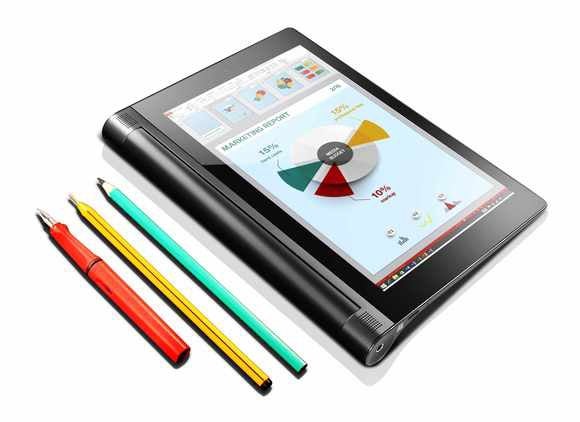
Forgot your pen? No problem, the Yoga Tablet 2 Anypen lets you write on it with a pencil, pen or even a fork.

When last I communed with a Windows-powered Lenovo Yoga Tablet 2 (the 10-inch version), the experience was soured by the worst auxiliary keyboard I've ever experienced. Thankfully, Lenovo didn't see fit to saddle the Windows version of the smaller $300, 8-inch Yoga Tablet 2 Anypen with something similarly irritating. The Yoga Anypen is a neat little tablet with an innovative design and versatile digitizer, though not necessarily a platform for serious business use.

What 'Anypen' means

The headline feature of the Yoga Tablet 2 Anypen is its advanced digitizer. You can use a pencil, ballpoint pen, or just about anything with a metal tip 1mm or larger. Most digitizers require a capacitive stylus with at least a 5mm tip. You might want to avoid X-Acto knives, but other than that you're good to go. You may of course, also use your fingers.

Another unique aspect of the Yoga Tablet 2 design is the cylinder running along one edge that allows for a far larger battery than a normal, flat tablet can accommodate. The battery tube also allows a grip that uses all your fingers, yet doesn't place your thumb near the display. Many is the time I've accidentally flipped pages on an iPad Mini.

The Yoga Tablet 2 (both sizes) has a distinctive kickstand that jackets the battery tube. It clicks into place at about 42-, 85-, and 180-degree angles, but you can manage angles in between due to the large amount of friction. Even more unique is the hole in the kickstand for hanging the Yoga Tablet 2 on a wall, for storage or an ad-hoc cinematic experience.

yoga tablet with anypen 1

The cylinder at its base lets you grip the tablet and also lets Lenovo put in a massive 6,400mAh battery.

Beyond that, the Yoga Tablet 2 Anypen (with Windows) is, well, a smallish Windows tablet running Windows 8.1. Its outstanding feature in that regard is the free year of Office 365.

Hardware-wise, you're talking a Bay Trail Atom Z3745 CPU, 2GB of DDR3/1066 system memory, an 8-inch 1,920x1,200 touchscreen display, and a 32GB eMMC SSD. Generally nice specs, but not a lot of disk space for running Windows. Indeed, with only 19.7GB of free disk space before we installed anything, we were unable to use our 20GB data sets for read/write testing.

lenovo yoga 2 8 pcmark8 work convetionalPCWorld

The Yoga 2's performance easily eclipses the older Atom used in the S12 Netbook, but the newer Surface 3's Cherry Trail Atom clearly stays ahead.

Performance and run time

In my hands-on, the Yoga Tablet 2 Anypen seemed lively enough, but the numbers are strictly Atom: PC Mark 8 rated the tablet at 1,375 in the work test and 897 in the creative test. 3D Mark didn't measure playable frame rates until it got to Ice Storm Extreme, a Web graphics game where the Tablet 2 Anypen scored 7,967. While that's quite nice compared to last generation Atoms, it's not Core-like. Overall performance, in fact, is pretty much identical to the 10-inch version's. In fact, you could look at the 10-inch Yoga Tablet 2 results from our Surface 3 review and pretend it's the 8-inch version and not miss a beat.

Regardless, there were no frustrating waits thanks to the Samsung MBG4GC SSD, which scored 168MBps reading and 75MBps writing 4MB files under CrystalDiskMark. That's quite good for an eMMC-based SSD.

Battery life was 6 hours and 58 minutes, and that's measuring with PCMark's battery rundown test, which works uninterrupted. Unless you drink a lot more coffee than I do, you can add a few hours to that figure.

Multimedia and connectivity

The Yoga Tablet 2 Anypen rendered 1080 movies quite nicely, and the sound is adequate. There's plenty of volume, enough to create distortion if you crank it up all the way. The stereo separation is also better than average, due to the placement of the speakers on either end of the battery tube. The microSD card slot on the back can expand storage if you want to keep a decent collection of movies on board.

The only ports on the Tablet 2 Anypen are the headset jack and the micro-USB port, which can be used for temporary storage as well as charging the unit, or conversely, charging other devices. Having that large battery on board is handy. The Wi-Fi is 802.11 a/b/g/n, and there's Bluetooth for connecting peripherals. Alas, there's no WiDi or even MHL support via the microUSB so with the lack of video ports, you really are stuck with the 8-inch display. 

As with any tablet worthy of the name, there are cameras: an 8-megapixel back-facing for snapping photos, and a 1.6-megapixel front-facing for Skyping and the like.

The 8- or 10-inch dilemma: Size vs. weight

When it comes to mobile computing of the business kind, I generally recommend larger displays and keyboards. My theory is that usage far exceeds tote time, so go for the best computing experience. However, when it comes to tablets, smaller means lighter (the Anypen weighs a measly 0.94 pounds) and easier to hold.

As the Yoga Tablet 2 also comes in Android flavors, though without the Anypen digitizer, the display-size (8- or 10-inch) buying decision is complicated. The 8-inch version is better as a tablet, but should you then be opting for Windows? For real work, the screen items and text are small even when you magnify to 150 percent. I had to skip all the way to 200 percent (a custom setting) before my admittedly bad vision was comfortable using Windows. At that point the extra pixels are basically wasted.

yoga tablet with anypen 3

Forgot your digital stylus? No problem. Use your pen instead with the Yoga Tablet 2 Anypen

Conclusion

The 8-inch Yoga Tablet 2 Anypen (with Windows) is a nicely realized tablet with long run time that lets you use just about anything as a stylus (I used a fork once). For tablet tasks, and the occasional light business chore, by all means.

For extensive business usage, opt for the 10-inch Yoga Tablet 2 but forgo Lenovo's misbegotten BC800 keyboard. Or, if I'm really going to be honest, buy an 11- to 13-inch laptop.


Source: Lenovo Yoga Tablet 2 Anypen (8-inch) review: Versatile, but small for serious Windows use

Tuesday, July 7, 2015

HP Pro Slate 8 features magic pen

OS: Android 4.4, KitKat; 5.0.2, Lollipop (available as download update)

Processor: Qualcomm Snapdragon 800, 2.3GHz

RAM: 2 GB Onboard storage: 16GB or 32GB eMMC

Display: 7.9", 2048 x 1536 pixels

Audio: headphone/microphone combo jack, microphones (two), speakers (two)

Camera: 2 megapixels, front; 8 megapixels, rear Networking: Bluetooth 4.0, NFC, Wi-Fi (802.11a/b/g/n/ac)

Ports: Micro USB 2.0 Expansion slots: microSD, nano SIM, ZIF connector with pogo pins Battery: Up to 10 hours (listed); almost 7 hours (as tested for this review)

Dimensions (width, length, thickness): 5.39" x 8.16" x 0.31"

Weight: 0.77 pounss

Price: $449 (16GB eMMC version)


Source: HP Pro Slate 8 features magic pen

Monday, July 6, 2015

More than half of toddlers can use tablets when they are just 1

While parents may struggle to use the latest in technology, toddlers have no such problem, Daily Mail reports.

Researchers have analysed hundreds of videos of babies trying, and quickly mastering, technology.

They found half of toddlers can use an iPad when they are just one, with 90 percent mastering the gadget by their second birthday. The researchers admit they were stunned by the results. The team of University of Iowa researchers set out to study more than 200 YouTube videos.

"By age two, 90 percent of the children in the videos had a moderate ability to use a tablet," said Juan Pablo Hourcade, associate professor of computer science in the UI College of Liberal Arts and Sciences and lead author of the study.

"Just over 50 percent of 12-to-17-month-old children in the videos had a moderate ability."

Hundreds of YouTube videos showing babies trying, and quickly mastering the iPad were watched.

Their paper is published in the proceedings of the CHI 2015 conference, the most prestigious in the field of human-computer interaction.

In the paper they write that their goal was to "provide a window into how these children are using tablets through an analysis of relevant YouTube videos".

What they found was information that supports "opportunities for research and starting points for design".

Hourcade and his colleagues defined 'moderate ability' as needing help from an adult to access apps, but being able to use them while displaying some difficulty with basic interactions.

He says that to his knowledge, other researchers have conducted surveys of the prevalence of tablet use by young children, however, the UI study is the first to study how infants and toddlers are actually using the devices. 


Source: More than half of toddlers can use tablets when they are just 1

Sunday, July 5, 2015

WhatsApp For Android And iOS: Fixes For Common Bug Problem And Issues

WhatsAppWhatsApp has almost killed SMS in several countries, apart from causing a worldwide decline in the global SMS usage. What started out as an SMS replacement has achieved its objective to a large extent, forcing carriers to offer WhatsApp-exclusive data packs and offers to make up for the declining SMS revenue.

While all that is really good, what happens when you face issues with WhatsApp? We have had our readers ask us about some issues with WhatsApp, and thankfully, they are all common problems. As such, you can solve them on your own by following our solutions. It's all really easy.

WhatsApp installation problems

Some users have reported installation errors on their phones, preventing them from using WhatsApp. Most of us are on a version of Android that's newer than Android 2.1, so that may not be what is causing it in the first place. If you have had trouble with the Play Store, you can download WhatsApp officially from the company's website and install it manually.

Go to Settings – Security and enable Install from Unknown Sources. This will let you install the WhatsApp apk you are going to download from whatsapp.com/Android.

Install WhatsApp on a tablet

This is another thing that our readers have asked us. WhatsApp is not officially available for tablets, but you can still use it. Download the apk from whatsapp.com/Android and install it the same way you installed it on your phone above.

Next, you will need a number to receive the one-time password from WhatsApp. Make sure you use your own number as this will be connected to your WhatsApp service.

Why can't I see my contacts on WhatsApp?

WhatsApp instantly recognizes which of your contacts use WhatsApp, and populates them in the Contacts column (it used to be called Favourites before). If your contacts are not visible in the Contacts column, then you will need to check for a few things.

WhatsApp contacts

  • Make sure you have the latest version of WhatsApp installed on your phone
  • Make sure your contacts have the latest version of WhatsApp on their phone
  • Make your contacts visible in the Contacts list. How? Tap on the 3-dot menu in WhatsApp, tap on Settings, and then tap on Contacts. Like so.
  • Block a contact

    Nobody is going to want to chat with people who they don't like. WhatsApp lets you block unwanted users who are annoying you. All you need to do is open the contact on WhatsApp, tap on the 3-dot menu, tap on More and then tap on Block. This will prevent the user from seeing when you were last online, or viewing your profile picture and lastly, they cannot message you either.

    WhatsApp Block Contact

    This is a two-way street, so you won't be able to view the other person's profile picture, or message them.

    Disable Last Seen

    For those who are slightly privacy oriented, last seen status on WhatsApp may not really be all that helpful. You will want to disable it if you do not want others to know that you have been constantly using it throughout the day. Or night. Or whatever.

    WhatsApp Hide Last Seen

    WhatsApp lets you set your Last Seen status as visible to "Everyone", "My Contacts" and "Nobody". Go to Settings, tap on Account, then Privacy and set your Last Seen settings like so.

    Media Auto Download

    Being in a group can get annoying real fast, especially when a lot of media is being shared. By default, WhatsApp downloads photos, videos or audio as soon as you receive them. You can, however, disable it and avoid it littering your gallery.

    WhatsApp Media Auto Download

    Go to Settings, Chat Settings, Media Auto-download and choose between different options for Wi-Fi and Mobile Data.

    If you have any more queries, feel free to ping us!


    Source: WhatsApp For Android And iOS: Fixes For Common Bug Problem And Issues